Home Dashboard Admin Intelligence Instructions Connect + Score a Call
Call Scorecard

Manual path: paste or upload first, AI scores first, then complete your human review.

Self Call Score
0
/100
Ideal Client Score
0
/50
Sign In Required
Log in to score a call
Your scores and results are tied to your account, so you'll need to be signed in before starting. It only takes a second.
Log In →
Manual v2 path

Paste or upload the call before you self-score.

Call IQ v2 starts with the source data. Add the recording link and transcript below so AI can produce the first score, themes, objections, quotes, next steps, and coaching recommendations. Your self-score is the review step after the AI result.

Use this page when

You have a transcript, recording link, copied notes, or a manual upload from any source.

Prefer automation?

Use Connect to import future calls from Zoom, Google Meet, Fathom, Fireflies, Otter, Gong, CRM tools, webhooks, Zapier, Make, CSV, or GHL.

Start manual scoringConnect a source instead
Safe first pass: existing recording link and transcript paste flow remains live. File upload is shown as pending until backend storage fields are confirmed.
Cool
(Do you like working with them?)
0510
0
Coachable
(Willing to do the work?)
0510
0
Committed
(Committed no matter what?)
0510
0
Convinced
(Trust you, or still skeptical?)
0510
0
Craving
(Want this resolved right now?)
0510
0
Decision maker?
Explainer - Decision Maker

Decision Maker. Are they the one who can actually say yes, or do they need to check with a partner, spouse, or boss first? A straight yes here means the deal moves at the speed of this one conversation.

(Are they the one who decides?)
Avatar fit?
Explainer - Avatar Fit

Avatar Fit. Do they actually match who you're built to serve, in industry, stage, and budget, not just someone friendly who showed up? A real fit is worth chasing hard. A near-fit usually isn't.

(Is this your ideal client?)
Referral?
Explainer - Referral

Referral. Did someone who already trusts you send them your way? Referred leads walk in with borrowed trust already built, so they tend to move faster and convert higher.

(Did someone refer them to you?)
Cold lead?
Explainer - Cold Lead

Cold Lead. Is this the very first time you've ever spoken? Cold doesn't mean bad, it just means there's no history yet, so the call has to do more of the trust-building work on its own.

(First time talking to them?)
Warm lead?
Explainer - Warm Lead

Warm Lead. Have they been following your content, emails, or events for a while already? A warm lead has done some of the convincing themselves before you ever got on the call.

(Have they followed your content for a while?)
10 points per question
2
Value Map
Explainer - Value Map

Value Map. This is one of the most powerful things you can do on a call, and it's dead simple. You draw a picture, together, of where they are right now and where they really want to be, so the gap between the two is right there on the screen and they can feel it.

Did you use one, live or in your head to steer the call? That's all this question asks.

Mark where they are right now (X marks the spot). Mark their target, the dream. Then the fire underneath it, the reason they'd actually do something about it.
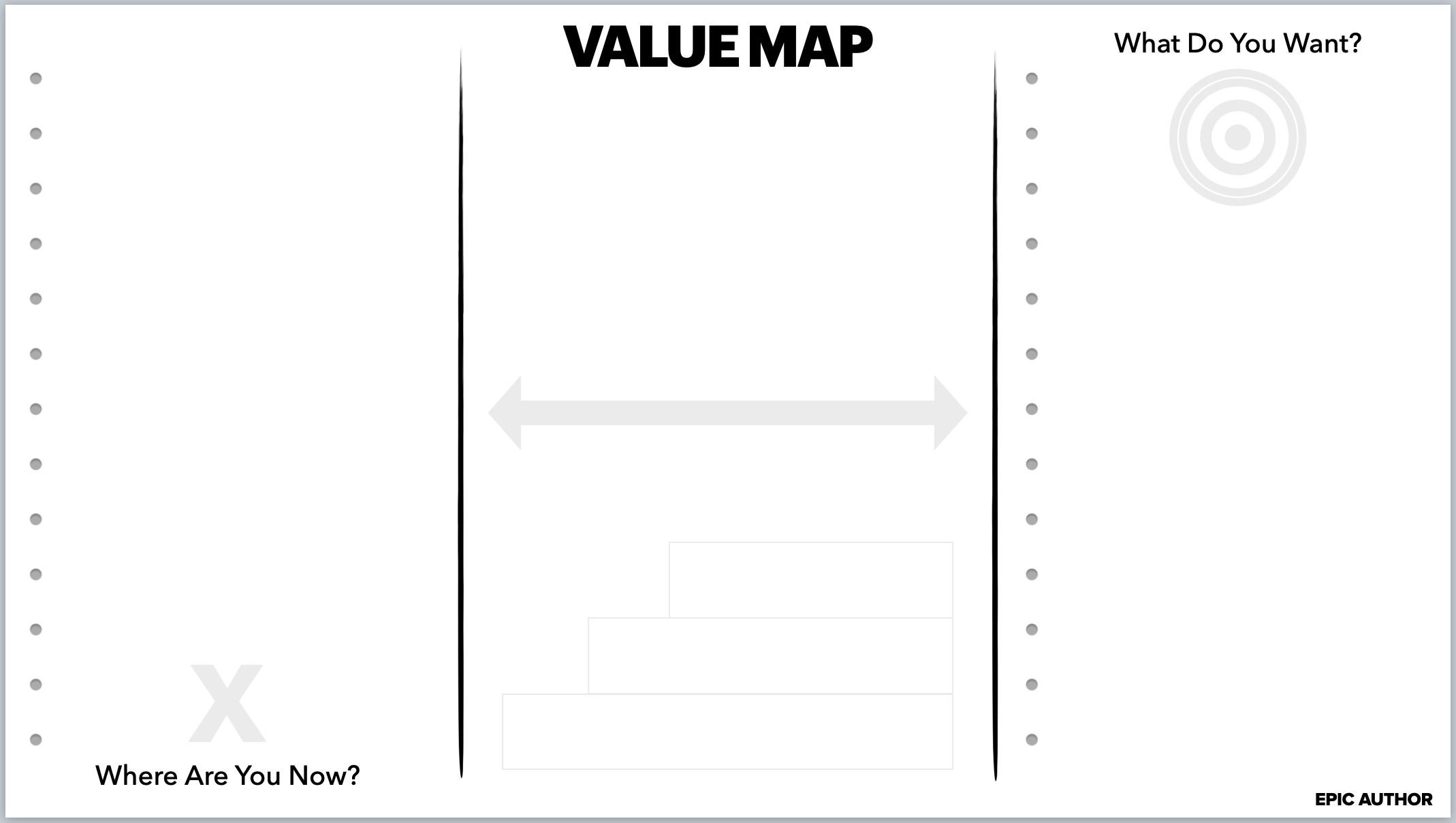
Value Map reference
Tap image to enlarge & download
(Did you use a Value Map?)
3
Script1 2 3 Transition
Explainer - 1 2 3 Transition

The 1 2 3 Transition is how you move any conversation from small talk to real connection.

1. Share why you're talking to them.
2. Explain the purpose or mission behind the call.
3. Ask what's most important to them about the topic.

View the 1 2 3 Transition guide ↗
(Did you use a script?)
4
The Pivot
Explainer - The Pivot

The Pivot. This is the moment you turn the conversation toward what's next, before you hang up and lose them. It doesn't have to be complicated, and it doesn't have to be a formal ask.

Be direct, like a doctor: "Honestly, I think your next step is X." Or use the 7 Magic Words: "Would you like my help with that?" Both work. Sometimes it's flat-out ("let's get a call booked"), sometimes it's already baked in ("cool, see you next week").

If you know you can actually help this person, it's kind of your job to make sure they don't walk away without a next step. That's not pushy. That's caring.

Easy way to nail it: first, play back what they told you they want and don't want. Let them say "yeah, that's it." Then bridge with, "based on what you just shared, I've got some ideas that could help." Then make your move.

(Did you ask (or suggest) their next step with you?)
5
BAM FAM
Explainer - BAM FAM

BAM FAM. Book A Meeting, From A Meeting. Before you get off this call, get the next one on the calendar, right now, together. None of that "I'll send you my link" stuff. That's how leads disappear. You book it live, you lock it in, and you keep the momentum you just built.

TRIPLE CONFIRMING THE APPT (Calendar, Email, Text)

Take the time before you end your call, and wait for them to confirm each of the following:

1. Calendar: "Do you see it on your calendar?"
2. Email: "Did you get the email?"
3. Text: "Did you get the text?"

You can use this script:

Calendar? I just set the appointment. Can you check your calendar real quick and let me know if you see it? Can you click YES to accept that appt? Great, thanks. I'll add all the details, including a link for our next call.

Email? Last thing, I just want to confirm your best email. Is it ___? Or is there a better one? Okay, great. I'm going to email you all the details, and shoot you a text.

Text? In fact, I'm going to send you a text now. Did you get that? After I send you an email with all the details, I'll shoot you a quick text so we know the email doesn't go to spam. Are you against shooting me a quick text back? No? Thanks!

(Did you book a meeting from a meeting?)
6
MW - Magic Wand
Explainer - Magic Wand

Magic Wand. This is where you get them dreaming. You're digging for the specific stuff they really want but don't have yet. Ask it straight: "If you had a magic wand and could have exactly what you want, what would that look like?" This is you getting them to describe their HEAVEN. Score yourself high if you dug into the specifics. Low if you let them stay vague, or you never really asked.

(How well did you clarify what they want?)
0
0510
7
FCC - Frustrations, Concerns, Challenges
Explainer - FCC

FCC means Frustrations, Concerns, and Challenges. This is the stuff standing between where they are and where they want to go.

Ask probing questions to get them to explain what's slowing them down or stopping them. Basically, get them to describe their HELL.

Score high if you really dug in. Score low if you stayed on the surface or tried to name their problems for them.

0
0510
8
Gap HacksQuantify The Value
Explainer - Quantify The Value

QTV. Quantify the Value. This is you helping them put a real number on what they want, and on what staying stuck is quietly costing them.

Three questions:

  • How much?
  • How long?
  • How many?

Get the numbers out of them, then have them do the math. Never do it for them. It means one thing when you say it, and everything when they say it.

Explainer - Gap Hacks

Gap Hacks are sneaky-good questions that get someone to see the gap between where they are and where they want to be, without you ever putting them on the spot. You don't need all four. Pick one or two and get really good at them.
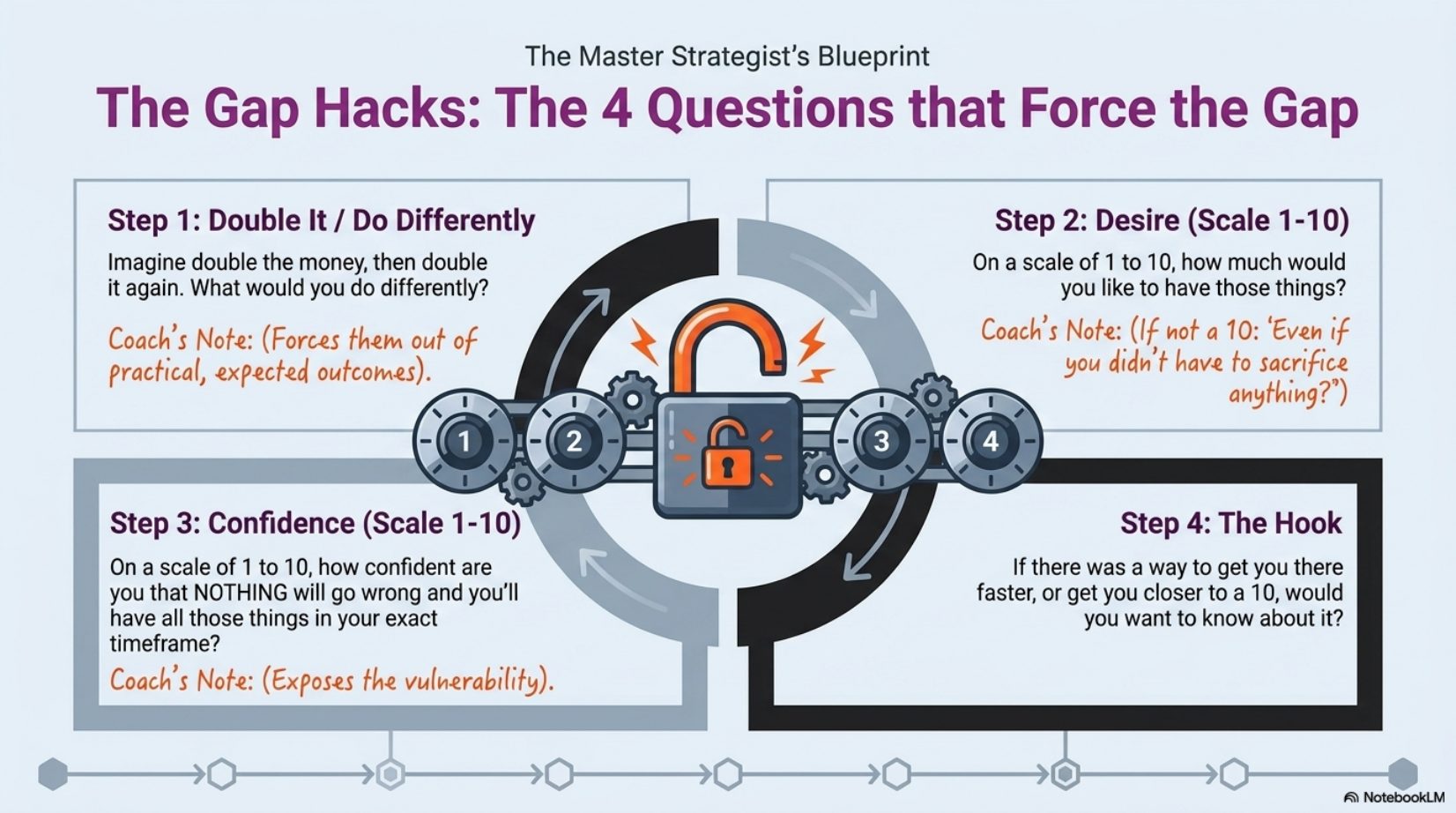
Gap Hacks reference
Tap image to enlarge & download
(Create the gap?)
0
0510
9
Active Listening
Explainer - Active Listening

Active Listening. Just repeat their own words back so they know you actually heard them. "So just to make sure I've got this right, you want X, and you don't want Y. Did I get that right?" Score high the more you reflected their exact language back. Low if you just moved on.

In practice: repeat back what you learned in their words.

(How well did you use Active Listening?)
0
0510
10
# of Intros
Explainer - Intros

Intros. The introductions you walk away with are often the most valuable thing on the whole call. So ask. Who do they know that you'd love to connect with? Just to be clear, you're asking for an introduction, not a referral, though referrals are great too.

(How many introductions did you receive?)
▶ Guest Intros & Q&A
Share your screen and complete this section live.
Intros (Who do you know I could interview?)
Scoring typically takes 10–30 seconds. You can safely close this page - results will be in your dashboard.
Scoring your call
This typically takes 10–30 seconds - hang tight.
Explainer - Script
Did you follow a script or framework, any script, as long as you chose it deliberately before the call? It doesn't matter which one you use. What matters is that you decided your structure in advance instead of winging it. Tap any framework below to learn it:
▶ The 4 C's
Connect, Care, Clarity, Call to Action - the four steps under every great conversation, in order. Skip one and you create a gap, and a confused mind says no and does nothing. View the 4 C's guide ↗
▶ The 3 C's (opening frame)
Connect. Clear the time. Set the Context of the call.
▶ Hi-Why-Try-Buy
Trevor's sales-call structure: Hi (open), Why (why you're here), Try (the offer), Buy (the close), plus Guarantee and Bonuses (to sweeten the offer).
Coach IQ
Disagree with the score? Teach IQ what it missed.
Section 1
What should this score have been?
Slide to the score you'd actually give this call.
0255075100
Your score: 50/100
Section 2
Where did IQ get it wrong?
Check any category IQ misjudged.
Section 3
What context did IQ miss?
Anything that happened before the call, or context only you would know.
Section 4
How should IQ coach you next time?
Tell IQ how to give you better feedback going forward.
IQ remembers this for every future call until you change it.
Section 5
Save your feedback

You changed the score but didn't tell IQ why. IQ learns faster when you explain what it missed.

You have unsaved feedback. Close anyway?